Cyber threats are constantly evolving, making awareness one of our strongest defenses. This month, we're sharing several important security updates, including:
- The launch of our new Cybersecurity Awareness Training
- New and emerging phishing tactics in Microsoft Teams
- An increase in recruitment scams targeting professionals across our industry
New Cybersecurity Awareness Training Launching
Our new Cybersecurity Awareness Training is launching across the organization. The training content was developed with contributions from writers associated with Saturday Night Live (SNL) and is designed to be shorter, more engaging, and just as informative as our previous training modules.
Training notifications will originate from IT Notifications (itnotifications@gracoroberts.com). Due to existing email security controls, these messages may initially be delivered to your Spam or Junk folder. Please be on the lookout for them and mark them as legitimate if necessary.
Microsoft Teams Spear Phishing Attacks on the Rise
Attackers are increasingly using Microsoft Teams to impersonate Help Desk personnel, managers, Human Resources, and other trusted contacts across multiple industries.
Two of our business units have already been targeted by these attacks. The good news: our employees recognized the threat and shut the attempts down immediately. Great job!
As a reminder:
- Be cautious of unexpected Teams messages requesting passwords, MFA approvals, or sensitive information.
- Verify requests through a known communication channel before taking action.
- If [External] appears next to the sender's name, treat the message with additional scrutiny.
- When in doubt, report the message to IT Security.
Recruiting Scams Targeting Professionals
 A long-running social engineering campaign known as Operation Dream Job continues to target organizations worldwide, particularly those in the defense, aerospace, technology, and manufacturing sectors.
In these attacks, threat actors pose as recruiters on professional networking platforms such as LinkedIn or contact targets directly through messaging applications. Victims are presented with attractive job opportunities and ultimately encouraged to download documents or software related to the position.
Recent activity has included modified PDF reader applications and other malicious software designed to install malware when opening seemingly legitimate documents.
Protect yourself by:
- Being skeptical of unsolicited recruiting offers, especially those that appear unusually lucrative.
- Confirming recruiter identities through official company websites and known contact information.
- Never installing software, PDF viewers, or other applications provided by a recruiter.
- Reporting suspicious recruiting contacts to IT Security.
Remember: Legitimate recruiters do not require you to install specialized software to review a job description or employment opportunity.
Cybersecurity is a shared responsibility, and a few extra moments of caution can prevent significant risks. By staying alert, following best practices, and reporting anything suspicious, you help keep our systems, data, and colleagues
safe. And don't forget about our Phish Alert button.
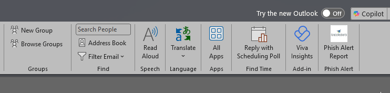
If you receive a suspicious email, report it by clicking the Phish Alert button located in the top-right corner of your email. If something doesn't look right, trust your instincts and
report it
Thank you for doing your part to strengthen our security every day.
Dr. Michael Neumann
.jpg)
-1.png)
.png)